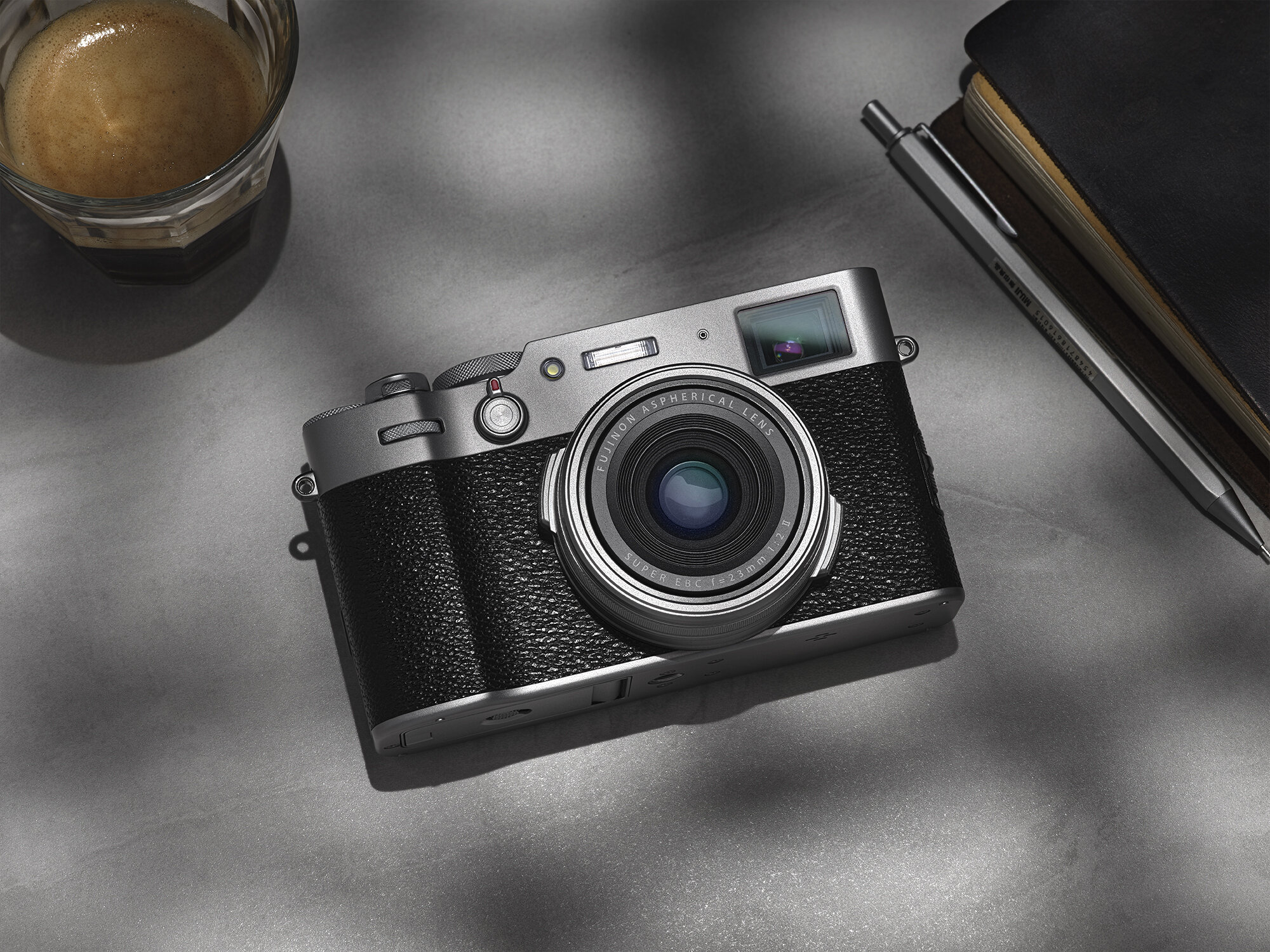
Fujifilm X100V

I was planning on buying this system upon release, but due to the global pandemic, I couldn’t justify such a purchase at the time. Even now I’m still waiting to get back to some kind of financial normality before updating my X100T.

I brought my X100t in 2015 to accompany me when I shot the series Mochimono. I was shooting film at the time and wanted a small point and shoot to document my time and also act as some sort of digital light meter/polaroid. I didn’t use it as much as I thought at the time, I was too content with shooting on my iPhone, which I now regret.

At the time I didn’t really like the camera too much, I think this was more down to the field of view, 35mm. I never shoot 35mm, always 6x7/6x6 film, so the format was something I grew to dislike the more I shot larger formats.

It wasn’t until I started spending a lot of time in Japan that I forced myself to love this camera, maybe 2 years after it’s purchase. I remember taking pictures at night with flash, nothing more than a bit of fun with the external flash, and I loved it. The quality I got from it and the engaging conversation about photography and, well how it all worked.

Since then I’ve weened myself away from shooting on my iPhone, and it’s the best decision I made. I would love shooting on my phone, only to get the images on a larger screen to see they aren’t worth using. Now I rarely take a picture on my phone, unless it’s junk stuff for Instagram stories, something that has zero worth.

So it’s come time to upgrade my X100T, I skipped on the F as I didn’t feel there was a massive difference for me to part with another £1000, especially as I got to a point where my T would basically be flung around with little care, now having been repaired twice… I think. Once Fujifilm announced the X100V, I knew, ok this is the upgrade I’ve been looking for.
Fujifilm_x100V_V1.jpg

This isn’t so much of a review, as this is a much loved system that continues to gain users and praise alike.

I just want to present my own thoughts on this camera, comparing to the T [and F respectively as I have less handling time].

Design & Handling

I’ve always enjoyed the Black finish on all Fujifilm cameras, but the updated more Leica M style of this camera looks incredible, especially in silver. I hired silver purely on the fact that it looks so beautiful. Will I be purchasing the camera in Silver? Doubtful, I don’t want to be seen with this camera, I want to take pictures without people realising, though I don’t think the style of camera/silver finish stands out too much.

A slightly bigger grip is welcome for my massive hands. Though I do feel I wish it had more grip, but that was ultimately ruin the design, so I can live without.

Changes to the body, as with recent Fuji cameras the D-Pad appears to be removed XPro 3, GFX 50R, GFX 100 to some criticism, yet it would reappear on the XT4, yet removed on the X100V. Huh?

At first I felt like this wasn’t the best move, due to basically removing 4 customisation buttons, something that Fujifilm was famous for. When setting up the camera for the weekend, I set up what I thought the most used features were on my T were,

  • Flash

  • Film Simulation

  • Shutter Type

That’s it… With the addition of the wonderfully intuitive ISO dial, which is a 1 to1 replica of a traditional film camera, I found that the FN button I had assigned [on my T] for quick ISO changing is no longer needed.

With the lack of of a D-Pad, you lose 4 buttons instantly, but there’s still 10 customisable buttons, if you need anymore than that, well I think something’s wrong. As I mentioned before, the lack of D-Pad was a concern, but having used the camera for the weekend, the thumb-stick is much more intuitive than a D-Pad.

Touch screen would go onto replace the 4 missing function buttons, but as with the XT3 & GFX 50R, I would turn them off. Other than for playback of images, and selecting a focus point, I see very little use for the touch screen.

The X100V has a fold out waist level screen that is flush to the body, a first I believe in any camera. It’s so streamline you wouldn’t know it was even a function. Clearly it’s been designed for those who want to shoot from the hip and still wish to view that they’re shooting.

Specs & Image Quality

In terms of summing up the cameras specs, It’s like a slightly less feature packed XT3/XPro3, which are very capable cameras.

It shares the same sensor, screen and EVF as the XT3, which is a camera I still use today and recently shot a portrait on it and was blown away by the quality for the size of the camera/sensor. Best way I can describe the quality is that it’s similar to a Canon 5DMKIV, which is still the industry standard for photography at the time of writing this.

Screenshot 2020-08-15 at 16.35.38.png

As I mentioned before, when shooting on an iPhone, the quality would be rubbish [compared to a traditional camera] when blown up on a screen. As you can see the quality between the X100V & MKIV is marginal despite the smaller APSC sensor, with the Fujifilm GFX 100 destroying everything.

Full specs can be found on the Fujifilm Page or DP Review.

Video & Vloging

The video in this camera is very capable, 10 Bit 4k at 29.97p 4.2.2 200MPS [externally], which is pretty standard on all professional cameras at the moment. So coming from the T with its woeful video functions to be able to shoot high quality 4K video in what is my everyday camera, well it’s very welcome.

I’ve always wanted to have a better camera to shoot a bit of small video, without bring along my XT3, so for things like holidays, this should be ideal.

As every reviewer/consumer seems to be obsessed with being able to record ones self, I thought that I would discuss this.

This isn’t a Vloging camera, due to the 35mm lens, which isn’t he widest, & lack of stabilisation. This camera has no reason to have IBIS, it’s not a video camera, and would just incur a larger form factor and price. For reviewers to even try and start a conversation about this is beyond me, it’s a point and shoot, everyday street camera.

But can you film yourself on it? Well I did without too much trouble, other than being shaky, then again if you were adamant on it, get a gimbal. I thought the Autofocus & face tracking was pretty good, I did a small test & face tracking didn’t lose me, even in a badly lit room. And no I won’t be posting that video.

The video very features are good, a nice to have, but I wouldn’t use it as my main camera for video.

Conclusion

When I brought the GFX50R I felt that I would take it everywhere with me, but I don’t, it’s just too big and I don’t need that quality, even though I thought I’d somehow need it. The X100 series, especially the V, hits the sweet spot for me in terms of quality & portability.

I would say that that T, and subsequently the V, is my favourite camera to use, the dials, the size and discreetness of it. If you’re looking for a camera that is stylish, portable and produces high quality images, the 100V will not disappoint.

Things I like/Pros

  • Same sensor as Flagship X series Cameras

  • 4K Video

  • New Lens [finally]

  • 11 FPS is ridiculous!

  • Retro ISO Dial

  • Waist level folding screen

  • Leaf shutter & high sync

  • Gorgeous design

  • USB C charging

  • wether sealed*

  • 4 stop ND built in

Things I don’t like/Cons

  • My hands are massive so this camera can feel a bit awkward to hold sometimes.

  • OVF - It’s a nice to have but rarely use, removing it and the hidden EVF would reduce costs in an ever dying camera market.

  • Buying a £100 [ish] filter to make the camera weather sealed.

  • Not being able to us the built in ND filter when shooting video.

It’s very hard to find much, if anything wrong with this camera. I was trying hard to find something that I dislike about this camera, and even my cons are splitting hairs at most.

If you have an T or F i’d recommend the upgrade. I’d say this is easily the most enjoyable fixed lens compact camera out there.

Thanks again to Fujifilm & Hire A Camera for the loan of the camera.

Portable Wirelesss on Set

I’m currently offering super fast portable unlimited wifi on set. Ideal for uploading files on the go and zoom calls.

Blazing fast unlimited internet on location. Faster than my BT broadband at home!

Blazing fast unlimited internet on location. Faster than my BT broadband at home!

81 countries are supported at no extra cost.

  • Aland Islands

  • Austria

  • Azores

  • Balearic Islands

  • Belgium

  • Bulgaria

  • Canary Islands

  • Croatia

  • Cyprus

  • Czech Republic

  • Denmark

  • Estonia

  • Faroe Islands

  • Finland

  • France (inc Corsica)

  • French Guiana

  • Germany

  • Gibraltar

  • Greece

  • Guadeloupe

  • Guernsey

  • Hungary

  • Iceland

  • Ireland

  • Isle of Man

  • Italy

  • Jersey

  • Latvia

  • Liechtenstein

  • Lithuania

  • Luxembourg

  • Madeira

  • Malta

  • Martinique

  • Mayotte

  • Monaco

  • Netherlands

  • Norway

  • Poland

  • Portugal

  • Reunion

  • Romania

  • Saint Barthelemy

  • Saint Martin

  • San Marino

  • Slovakia

  • Slovenia

  • Spain

  • St Martin

  • Sweden

  • Switzerland

  • Vatican City

Please get in touch for more info & rates, 07540325906 or stuart@stuart-harper.co.uk

Plastic Free July 2020

I shot some new personal work to coincide with this years Plastic Free July. The environment and reducing [plastic] waste is something I care very much about and with recent images of beaches and parks covered in litter from people enjoying the recent good weather, it does appear people either do not care about the environment.

I implore people to to try and reduce plastic consumption this July, and maybe continue it going forward. It’s really important we all make a change before we damage our planet beyond repair.

I look forward to sharing some more work in the near future, hopefully some new charity work.

What is plastic-free July and when is it?

Plastic-free July is a month-long campaign during which millions of people around the world take the challenge to reduce their use of single-use plastics such as plastic bags, takeaway containers and plastic cutlery.

The challenge is taking place till the end of this month, 31st July. 

Hero_Floating_Blue_Bag_V1.jpg

Plastics to try and remove/use less

  • Take away coffee cup

  • Plastic bags

  • Reusable water bottle

  • Soap in single use plastic bottle

  • Food packaging - such fresh fruit and vegetables in plastic bags

  • Shopping at bulk stores

  • Buy Less

  • Recycle & reuse

Top 10 Facts on Plastic Pollution - plasticoceans.uk

These facts are from our 'Science Behind The Film Document' that supports A Plastic Ocean.

  • 350 million tonnes of plastic are being produced each year. This could weigh more than humanity, estimated at 316 million tonnes in 2013.

  • 8 million tonnes of plastic enter the ocean every year. If waste management practices don't improve, scientists predict this amount could increase tenfold by 2025.

  • Plastics make up to around 75% of marine litter, although this can be up to 100% at some sites.

  • Plastic in the ocean breaks up into smaller fragments called microplastics, which have been identified in commercial fish consumed by humans.

  • Half of all plastics are single-use applications, used just once and then disposed of.

  • We don't know how long it takes for plastic to break down. It's estimated it could take up to thousands of years to degrade.

  • Birds are highly susceptible to plastic ingestion. It is estimated that over 90% of all seabirds have ingested plastic.

  • Birds are highly susceptible to plastic ingestion. It is estimated that over 90% of all seabirds have ingested plastic.

  • The "island of trash" - also known as the Great Pacific Garbage Patch has been misreported. A large area of plastic debris does exists here,  but a big soup of microplastics make up to 94%.

  • Plastic acts as a sink for chemicals already in the environment. The material is able to attract these chemicals and transport them long distances.

  • Studies show plastic chemicals can act as endocrine disruptors. Endocrine disruption is linked to health effects like cancer, birth defects, and developmental problems in children.

Wireless Monitor Set Ups

I’m happy to announce that I am now offering up to 7 screen set up on set.

  • 4 devices [Phone & Tablet] can be connected at one time. using your personal IOS or Android Device.

  • 2 full monitors [1 wireless, 1 wired]

  • 1 Laptop Monitor [wired]

That’s a total of 7 screens on set!

Monitor_Layuot copy.jpg

Above depicts a typical set up that could be achieved on set.

  • Macbook Pro

  • Wired monitor

  • Wireless Monitor

  • x4 IOS/Android devices mirroring the wired monitor

This kit can also be adapted to location see below,

Monitor_Layuot_2.jpg

Alternative options,

  • Laptop

  • Wireless Monitor

  • x4 IOS/Android devices mirroring the wired monitor

Monitor_Layuot_3.jpg

On location/outside set up. It’s still possible to have this system working on location remotely.

  • Laptop

  • iPad Pro 12.9 wireless

  • x4 IOS/Android devices mirroring Laptop display

iPad_Capture_Mirror.jpg

The iPad Pro 12.9 can be used in the following format.

  • Mirroring Capture One viewer [wIfi or radio options available]

  • It’s own individual screen [wifi or radio options available]

  • Streaming from Capture One, watch images come in, view, rate them. [Wifi needed]

  • If you wish to use an iPad solely for other iPad applications, this is also an option.

The iPad can be used free and or easily mounted onto a stand.

Powering the iPad will be either with a wall AC adapter or HyperJuice USB external battery.

* Wireless Monitor still runs off domestic power [wireless power options coming in the future]

** A free application will be needed to use this function on individual phones/tablets. Information on where to find this app will be give out on set.

Wireless Monitors Information - Coming Soon

I will be updating this page with information on how my wireless monitor package can help your set during current social distancing on set.

Social distancing with wireless monitors

I am happy to be able to offer wireless monitors on set going forward. This is a great bit of kit that will free up long cables trailing across set, and also having the portability on location.

iPad Second Monitor

The 12.9” 2020 iPad can be used in two ways,

  • as a second monitor

  • Capture Pilot for clients to review & rate images.

*Wireless internet is needed for this option.

Wireless 24” & 27” Monitors

Wireless monitors displaying images as they come in. Up to 4 IOS [iPhone/iPads] are able to connect to this system.

Up to 400’ distance from Transmitter [main monitor]

Low Latency

Wireless internet is not needed for this set up.

*Users wishing to use the IOS function to view on their own personal device, must down a free app from the Apple store. Information will be provided on set.

10M Wired option available

If you’d prefer, a 10M wired monitor is also available.

Environmentally Friendly PPE on Set

As PPE is now going to be the norm on set, this means more plastic waste, this is something I want to limited to a minimum to none. So I will be only supplying biodegradable gloves and cleaning wipes. I will not be providing reusable masks & visors. I advise you to bring your own reusable [washable] masks to set.

I would advise washing of hands as realistically as possible/when you feel it’s needed.

Some information on the gloves I will be providing for those who may have an allergic reaction to latex and other materials.

Gloves

100% biodegradable disposable gloves that provide high levels of dexterity, protection and comfort

  • The unique Eco Best Technology® ensures the glove fully biodegrades once disposed of, helping to improve your carbon footprint

  • 4mil thick nitrile feels like a second skin allowing for enhanced accuracy when carrying out tasks

  • Latex and powder free to reduce the chance of allergic reactions

  • Rolled cuff protects your forearm from liquid run down

  • Antistatic properties

  • Chemical resistant to EN374 parts 2 and 3

  • AQL 1.5 medical grade

  • Coating material: Nitrile

  • Grip Design: Textured fingertips

  • Cuff Style: Beaded

  • Colour: Green

  • AQL: 1.5

  • Medical Grade: Yes

  • Food Safe: No

  • Chemical Resistant: Yes

  • Powder-free: Yes

  • Length mm: 240

  • Typical Applications: Automotive, Construction & Utility, Engineering and Manufacturing, Food Manufacturing and Prep, Janitorial, Oil and Gas, Warehousing, Transport and Logistics, Waste Management and Local authority

Cleaning Wipes

With an enhanced resealable lid to lock in moisture, these Dettol biodegradable antibacterial surface cleaning disinfectant wipes are proven to kill 99.9 Percent of bacteria.

They are ideal to disinfect any surface including food preparation areas like chopping boards and baby equipment like high chairs. Complete with enhanced pocket technology to create thicker, moisture-rich wipes, these Dettol biodegradable antibacterial surface cleaning wipes are completely bleach free, odourless and leave no taint.

They are a must-have in any home as they kill Salmonella, Rotavirus, Flu Virus (H1N1), 90 Percent of all allergens and even antibiotic resistant MRSA. In a convenient and easy to use format, they are ideal for fast and hygienic cleaning.

Gloves & Wipe swill have their own waste bin that will be recycled.

Face Mask & Visors

I will be using both face masks and visor [depending on circumstances].

Hand Sanitiser

Hand Sanitiser will be provided.

Remote Viewing On Set - COVID 19

Following my recent post on the Government guidelines & The AOP, I have decided to add a new item to my kit,

iPad Pro 12.9

I will now be offering remote wireless viewing for clients via screen sharing and Capture One. This feature is also great for food stylists too, full colour live view when you’re on set working away as well as seeing each individual images as they are shot.

This can be used up to 30FT, so keeping well outside the 2m distance that’s advised.

capture one.jpg

As mentioned in the previous post,

10M screen [wired, wireless coming soon] for viewing and rating of images is also available and will be the standard for shoots in the studio going forward.

Covid 19 & Social Distancing on Set

The AOP recently released shoot guidelines to continue safely amid this current pandemic.

New additions to kit to help meeting social distance guidelines.

Wireless Monitor - This can be used up to 30FT, Images can be viewed, rated etc… [More Info Soon]

iPad Pro - Wireless viewing of images, live view etc… [Great for food stylists too!] [More Info Soon]

PPE - Gloves & wipes will be provided. I would advise you bring your own washable masks, but I will have disposable masks on standby.

During The Shoot

  • a)  Stagger call times where possible to avoid congestion.

  • (b)  Keep the unit as small as possible and minimise the number of crew/

  • agency/client/talent on set at any one time.

  • (c)  Wash and thoroughly dry hands on arrival and during the day at regular intervals.

  • Alcohol-based (60% minimum) sanitisers should be easily accessible throughout the

  • set/location as well as soap and water provided wherever possible.

  • (d)  Consider a video-conferencing facility relaying video remotely to agency/client.

  • (e)  Consider increasing video monitoring on set to avoid clusters of people.

  • (f)  All crew to adhere to any safety guidelines or notices given on the day.

  • (g)  Consider any space markers where possible.

  • (h)  Walkie-talkies/radios to be correctly sanitised, bagged-up and labelled with crew names

  • before distribution - do not share equipment.

Location/Studio

  • (a)  Initial location research can be done remotely using location libraries.

  • (b)  2m-distancing must be used when visiting locations and meeting property owners/managers.

  • (c)  Note that councils are unlikely to grant any filming/location permits at the moment.

  • (d) Try and ensure common areas and holding areas are outside wherever possible.

  • (e) Prefer/prioritise for one location, without unit moves, per day.

  • (f) Prefer/prioritise for location in a 4G area, where possible, to transmit live video over the internet, if WiFi unavailable.

  • (g) Locations are to be well-ventilated. Consider bringing additional equipment to change (not recycle) the air regularly if this is not the case.

  • (h) Avoid the use of vapours, steam and hazers (including but not limited to dry ice, oil ,mists or glycol) as they are likely to keep airborne infections in the atmosphere longer.

  • (i) Where possible, all locations required to share their own COVID-19 preparedness plans.

  • (j) Locations to be cleaned prior to and after shooting, if possible. Locations may want to take this on themselves and charge an extra fee for this.

  • (k) Avoid distant locations which would require overnight accommodation for those involved. Also avoid locations which will not permit minimum 2m-distancing.

  • (l) All recces to involve minimum crew only (self-driving and maintaining 2m-distancing throughout). Masks and gloves available for all attendees as required c/o production. (m) Location prep: Pre-light/set-build/set-dress etc., to be undertaken separately by one crew/department at a time, where possible.

Fujifilm XPro-3

I was kindly lent a XPro 3 by Fujifilm [through Hire a Camera] for two days during the current lockdown due to Coronavirus, I thought I’d cover a camera system I’ve wanted for sometime. This piece is more about my thoughts on a rather divisive camera opposed to a specs sheet.

The big talking about this is the screen, and that it’s hidden. This is a huge problem for many owners of the XPro 2, as you will see comments on FujiRumours & Youtube going off about this design.

When I first tried the XPro-3 at Fujifilm SQ in Tokyo, I liked the concept of this design and getting my hands on it again and handling it, I really wasn’t sure how I felt about it.

2020_04_18_XPro_3_Shot_01_0104_EDIT copy.jpg

When I did eventually get outside on my daily walk to test the camera. I actually didn’t find the lack [hidden] LCD a problem at all. I kinda enjoyed it. Sitting at my desk the day before, flipping the screen back and forth, seeing how it would be used in an everyday scenario, my thoughts were ‘this is going to be so cumbersome to use’.

But actually using it for an hour, I don’t have any qualms about the hidden screen.

I guess I shoot this system how I’d shoot my X100T, mostly using the EVF for 90% of the operation. When shooting with my X100T I often view images and menu through the EVF as I feel you get a better screen through the EVF in bright sunlight, no glare etc... Even on my GFX, If I wish to show someone a photo, I’d suggest they look through the EVF opposed to the rare LCD.

I like the idea of having a waist level LCD, granted many cameras can do this, but to have a simple one pull down motion. This is great for shooting from the hip and on the sly, which is great for street photography.

I feel like people are missing the point of this camera, it’s niche, yeah I get that. But this camera is seen as a more ‘purer’ form of shooting and enjoying the ‘experience’, opposed to constantly looking at their images after each shot.

The fact you get Youtube reviewers, saying ‘this camera isn’t for VLlogging’, they’re missing the point. The Xpro line as always been seen to cater towards street photography. Not every camera is brought for ‘selfies’ and ‘VLogging’.

Sub Menu & Film Simulations

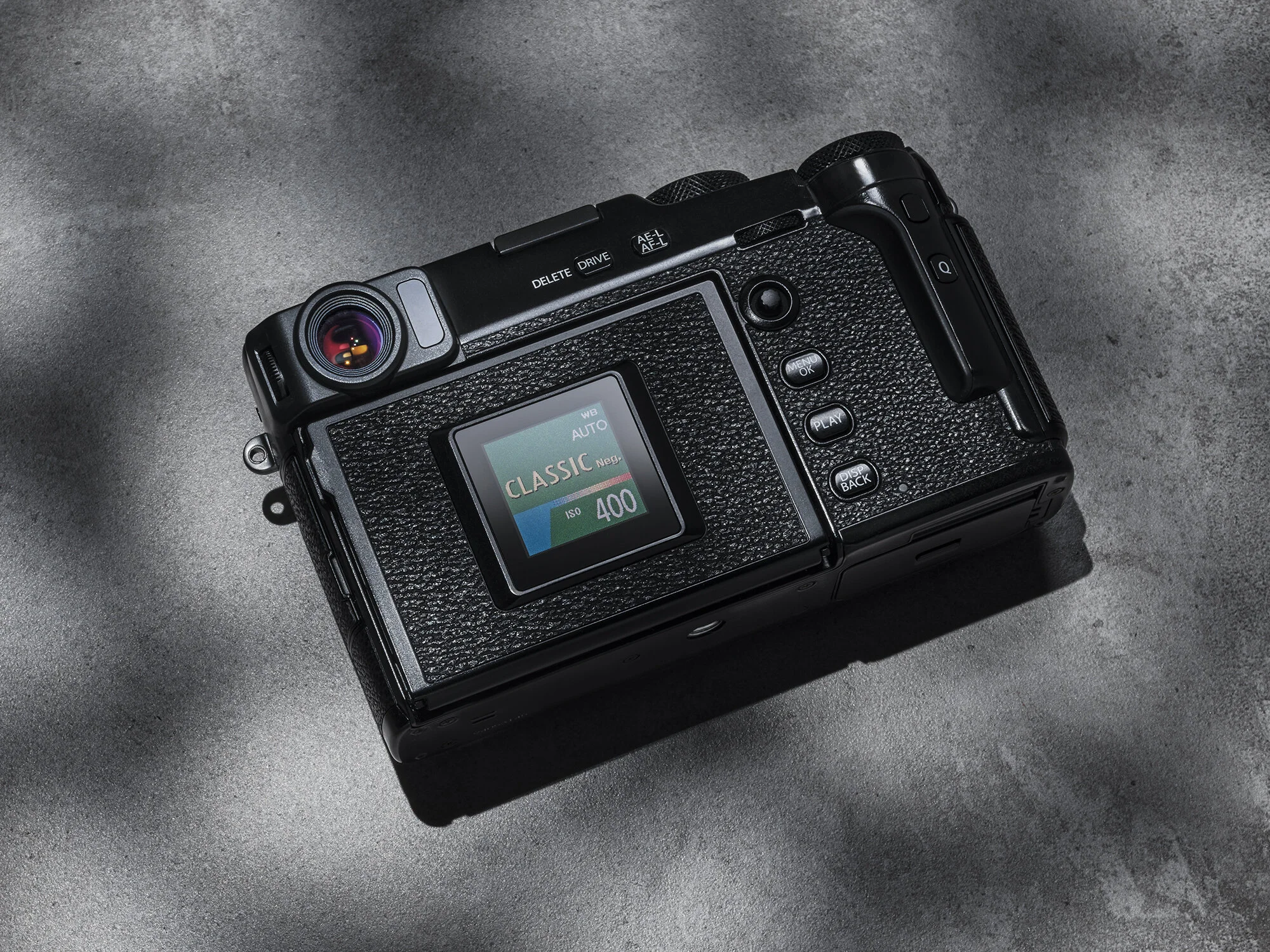
With the new hidden display, we have have a small sub menu that can display two different looks. A screen that is very similar to those on on the XH-1 & GFX 50S. I find these displays really handy for shooting and having it on the back of the camera is very helpful.

The alternative is to have the film simulations, ISO & white balance shown in a form that is reminiscent of the cardboard tab you’d take from a box of film and slide into the rear of the camera to display what film stock and speed you’re using.

I love this feature, some say it’s a gimmick and maybe it is, but it’s nice to have the option of two different screens. I found myself leaving it on the film stock, it’s cute. I think If i were to be shooting on a job, I’d likely change it to the more informative display. But it’s nice to have a bit of colour on what is a very stealthy [black] camera.

Fujfilm film simulations above, easy to change without having the view via the LCD screen.

Classic Negative is the new Film Simulation released on this camera. It’s also available on the XT3, but only on the RAF file in Capture One, I’m sure a firmware will address this soon.

I really love the look of Classic Negative. I would always use Classic Chrome when I shoot, but Classic Negative will now be the default look for shooting personal/everyday photographs. I always thought that CC [Classic Chrome] gave the most filmic look to the films, desaturated, blue tinge to the image, but this Classic Negative really does look like how I remember Superia Film [What it’s trying to mimic].

Xpro_3_Classic_Negative_Classic_Chrome.jpg

Left if Classic Negative, right is Classic Chrome. Same settings applied just different LCC profile.

I like both looks, but the CN gives more of blue flatter/matte image, you can see the shadows have ben pulled slightly in the shadows.

EVF/OVF

I’m going to mostly talk about the OVF, personally I use this function on the X100T about 5% [or less of the time], maybe very low light with flash, just for fun, that’s it. It’s lovely to look through and is a very cool bit of technology, especially with the lay over of information [like an old rangefinder].

But for me it’s just not very practical for my shooting style, I’m very particular with how accurate things are in frame. I had a lot of issues with my Mamiya 7, especially with portraits. I could never shoot a portrait that I thought was well composed, due to the rangefinder aspect of the camera. The same applies for the OVF on all Fujifilm cameras.

It’s been well documented that the design of the EVF/OVF is one of the more expensive aspect of the camera. Camera markets are falling and cameras are becoming a tough sell to the average consumer. Granted the already niche XPro lines has become even more niche with the implementation of this hidden screen, so you’d think any means of cutting costs would make sense. Part of me feels they should bin off this whole interchangeable EVF/OVF, go down the more XE3/GFXR route, this will bring down costs too.

This camera is fundamentally for the streets, 24-35mm is where this body will thrive, especially when using the OVF. There are plenty of videos featuring reviewers using much longer focal lengths and then slagging it off. I get their concern, but the whole idea behind this camera is not for shooting 70-200mm lenses, especially with the OVF.

If you do wish to shoot longer focal lengths, EVF is the way forward [full stop].

XPro 3 vs Leica M10D

The XPro line as always been compared to Leica. If you can’t afford a Lecia, by a Fujifilm XPRO/X100.

In 2018 Leica released a 24MP Full Frame Rangefinder camera with no EVF or a screen, I don’t remember users going as mental as they are over the XPro 3… Oh, did I mention it’s £6000…

That’s all I’m going to say on that.

Analogue Photography?

As I said in my first hands on with this camera last year,

…everyone seems to love film, Fujifilm give you a more analogue way of shooting, and people lose their heads over it.

I stand by this comment. Film has had a resurgence in recent years, and even with its ever increasing price, people still seem to shoot it.

That feeling of taking shots and not ‘chimping’, going home and loading into Capture One, seeing what you got. I did this a lot when shooting football [Granted I shot that on the XT3, but that method of shooting applies directly to the XPro3] , it’s so fast paced I have to rely on my judgement, and when I did import the images, that feeling of analogue nostalgia kicked it.

And that feeling of accomplishment and joy of imagery is a feeling that’s very enjoyable, ok that sounds odd, it’s hard to word, but those who have shot film will understand this.

Video

This isn’t a video camera, this isn’t a VLog camera for Youtube, so things like a HDMI port has been removed, as is the headphone jack, but a USB C adapter can be used.

Saying that I like the quality of the video out of this camera, it’s gorgeous. The XT-3 is still a better camera for video, but I’d never shoot paid video work on the XPro-3, no one would, it’s just not functional. If I wanted to capture a bit of quick video, this camera would be more than capable, so it’s a nice feature to have, in what is a camera focused on stills.

DCI 17:9 30p 100Mps Film Simulation Standard [Handheld]

Battery

Fujifilm recently released a larger battery in the XT4, and I imagine this will be implemented in every future iteration of Fujifilm camera, but maybe not. As it’s physically a larger battery, the form factory of future [compact] cameras would change.

They decided to go from the existing battery that people have been urging them to update for sometime. I think the battery life of this camera is fine, between 370-440 shots. If you use it hows it’s intended to be used, not using the LCD, You should be fine shooting on one battery.

These batteries are so small & cheap, and if you’ve invested in Fujifilm cameras prior to this release, you’ll have loads lying around.

The camera is also able to charge via USB C, which is handy, as you can charge off of a power bank on the go.

Tethering

You can tether to Capture One with this camera and this is where I feel the hidden screen works. If you’re shooting to Capture One, you’d never look at the back of your camera, all camera setting would be set by yourself or your digi.

I could imagine shooting this system on a lifestyle shoot or studio setting. Even un-tethered, you’re not going to be checking the back of your screen every 3 frames to see if you’ve got the shot.

Overall

I already started writing my conclusion on this camera before I got out there and shoot on it. I’ll go as far to say I felt that ‘it’s form over function’. But after using it, I don’t feel that statement holds true anymore. I really feel people need to try this camera for a weekend, then you know if it’s for you or not.

It’s very easy to be off put by the idea of a hidden screen and in some applications I can see it could be cumbersome to use. But you really just have to borrow it for a few days and use it, I think people would change their mind on the whole hidden LCD .

Pros

  • USB C Charging

  • Colour Neg Simulation

  • Decent 4k Video

  • Rare view finder with film simulation, I love it!

  • Titanium Finish

  • 11 FPS is great in such a system

Cons

  • The lack of rear facing screen, this is a huge deal breaker for many.

  • OVF feels unusable with longer focal length lenses.

  • ISO dial, clunky

It’s a really beautiful camera and I’ve longed for an XPro-2, and wish I got one at the time, but will I buy an XPro-3?

My initial thoughts were a flat out ‘No!'.

But after using it for the weekend I’m more sold on it. If I could only have one X series camera [with interchangeable lens], it would be the XPro-3, as the handling of the camera suits my style and I find it much more enjoyable to shoot than my XT-3, even though the XT-3 is a better camera in terms of features.

My X100T is showing its age [both technology and physically] and with the recent release of the X100V, I feel that the X100 is a better system for me. If I were to by an XPro-3 I can’t imagine I’d ever take off the 23mm lens, so it makes more sense to follow up with an X100V once the world is back to normal.

Thanks for reading, bit of a mishmash of things. Thanks to Fujifilm UK & Hire a Camera. Be safe out there.